See more
High-definition optics bring a magnified operative view to the monitor.
 Request consultation
 01 · Areas of surgical care
A visual guide to the cameras, access systems and surgeon-controlled technology behind modern laparoscopic and robotic surgery.
THE SPARK APPROACH
Surgical Precision viaHigh-definition optics bring a magnified operative view to the monitor.
Ports create sealed working channels instead of one long access incision.
Open, laparoscopic or robotic access is selected around anatomy and safety.
Begin with the surgeon’s eye
A 0° telescope looks directly along its shaft. A 30° telescope looks thirty degrees away from that shaft; rotation then redirects the oblique view around the axis. This is separate from the field-of-view cone, whose width varies by model.
Selected diagnostic or low-force applications.
Common for access-conscious work and secondary viewing.
Often chosen for strong light transmission and image detail.
May accommodate larger scopes, staplers or specimen systems.
Useful when the target lies directly in front of the telescope and a stable, straight-ahead horizon is preferred.
Rotating the oblique lens redirects the view without moving the port—helpful for looking over, under and around structures.
It is the angle between the scope’s shaft axis and its central viewing axis. The cone width is a separate manufacturer specification.
The operating ecosystem
A telescope carries the image. A camera and processor build the picture. Carbon dioxide creates working space. Ports, instruments, energy, suction and irrigation let the surgeon work through that space.

Telescope, camera head, processor, light source and operating monitor build the view.
The insufflator delivers CO₂ through sealed trocar valves while monitoring pressure and flow.
Straight graspers and dissectors pass through separate ports to create safe triangulation.
Suction and irrigation clear fluid or smoke without replacing visual judgement.
The rigid telescope carries an optical view to a camera head. A light source illuminates the cavity; the processor balances colour and builds the image displayed on the operating monitor.
A trocar establishes a path through the abdominal wall. Its cannula remains as a sealed sleeve so the camera or instrument can pass while the working space is maintained.
A regulated insufflator delivers carbon dioxide and continuously responds to measured pressure and gas loss. Settings are individualised by the operating and anaesthesia teams.
Graspers, dissectors, scissors, needle holders, staplers and energy devices perform specific tasks. The tool follows the operative plan—it never replaces judgement.
A dual-purpose device removes fluid or smoke and delivers controlled irrigation. A clear field is fundamental to recognising anatomy and responding to bleeding.
Table position, ventilation, circulation and pressure interact. The anaesthesia, nursing and surgical teams coordinate throughout the case.
Pneumoperitoneum
Carbon dioxide gently lifts the abdominal wall away from the organs. Access technique is chosen for the individual case, and safe placement is confirmed before insufflation proceeds.
Entry may be closed (Veress), open (Hasson), direct or optical—selected for the patient and operation.
The surgeon verifies safe entry before the abdomen is expanded.
The insufflator creates space between the abdominal wall and organs.
Pressure, gas flow and the patient’s physiological response guide adjustments.
Insufflation changes pressure inside the abdomen and can influence breathing and circulation. The teams watch pressure, flow, ventilation and the patient’s response—not just a number on the machine.
A visual port-strategy atlas
Camera overview, working distance and instrument triangulation shape a port plan. The maps below show concepts—not instructions and not a patient-specific operative plan.
Exact sites change with body habitus, target anatomy, pathology, previous scars, technique, equipment and surgeon. Hernia layouts vary especially widely by defect and reconstruction plane.
The patient’s left lower-quadrant port (viewer’s right) works across the abdomen toward the appendix in the patient’s right iliac fossa.
Both right-sided ports are intentionally drawn on the viewer’s left because this is an anterior view of the patient.
The bilateral working ports form a broad triangle with the central camera. Height and spacing change with the unilateral or bilateral target.
The ports enter the preperitoneal plane without traversing the peritoneal cavity. Exact vertical spacing is tailored to the pelvis and target side.
This example approaches a midline defect from the patient’s left. The entire arrangement may be mirrored or redesigned around the actual defect and adhesions.
eTEP and TAR layouts are highly individualised. This plate names the side actually drawn and should not be read as a universal operative plan.
The fan converges toward the hiatus. Patient-side labels follow the same anterior-view convention used throughout the atlas.
This is explicitly a left-sided example. Right colectomy, transverse colectomy and rectal surgery use different geometries and may include a separate extraction site.
The bilateral lower-quadrant ports converge on the pelvis. Uterine size, adhesions, specimen route and chosen technique can change the plan.
Robotic-assisted surgery extends keyhole access with a controllable distal wrist. Compared with rigid laparoscopic instruments, its added articulation supports precise, deliberate strokes and superior manoeuvrability within narrow abdomino-pelvic spaces—while every movement remains under the surgeon's control.
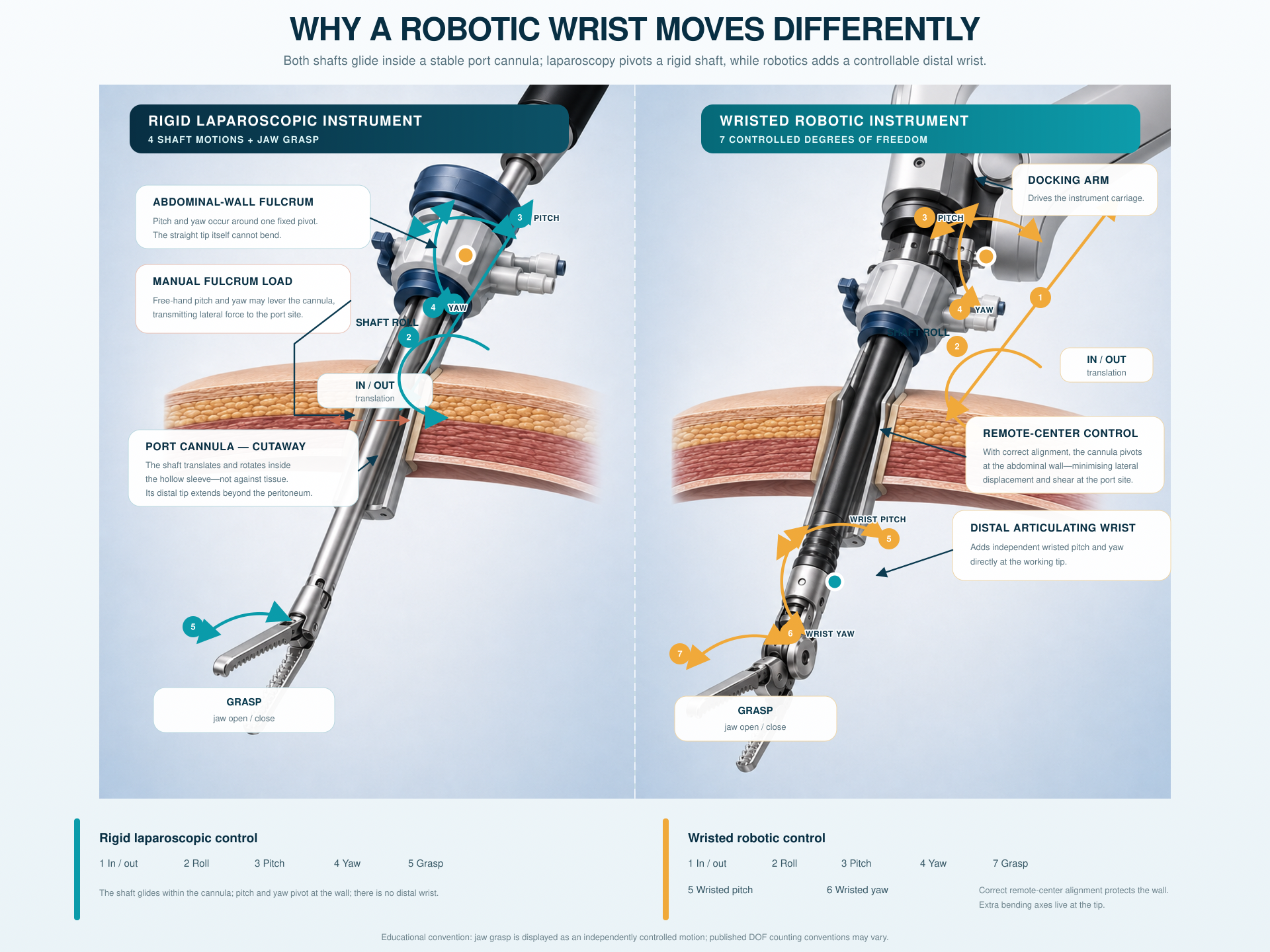
The valved cannula traverses each abdominal-wall layer and preserves the CO₂ workspace while tools move through it.
The trocar behaves as a fixed fulcrum: movement outside the body produces an opposite-direction movement at the internal tip.
An internal wrist adds pitch and yaw near the working tip. Axial roll and grasp remain under the surgeon’s continuous control.
7 gross DOFs from arm to wrist; 20+ when finger joints are modelled.
4 tip-positioning DOFs in a common model; grasping may be counted separately.
7 instrument DOFs for da Vinci EndoWrist instruments; specifications vary by platform.
Natural flexion, extension and radial–ulnar deviation.
No internal wrist: the rigid shaft and tip move as one.
Internal pitch and yaw reorient the tip beyond the trocar.
The hand can be repositioned freely in open space.
The abdominal wall creates a fixed pivot and reverses hand-to-tip direction.
Software maps the surgeon’s input around a controlled remote-centre pivot.
Forearm pronation and supination have a finite anatomical range.
The surgeon rotates the shaft manually from the external handle.
The instrument provides broad surgeon-controlled roll; exact range is device-specific.
Both laparoscopy and robotic surgery use keyhole access, a camera and long instruments. The important mechanical difference is how the surgeon's movements outside the body are translated at the working tip inside the abdomen.
Both approaches depend on safe access, clear anatomy, visual control, tissue respect and sound surgical judgement.
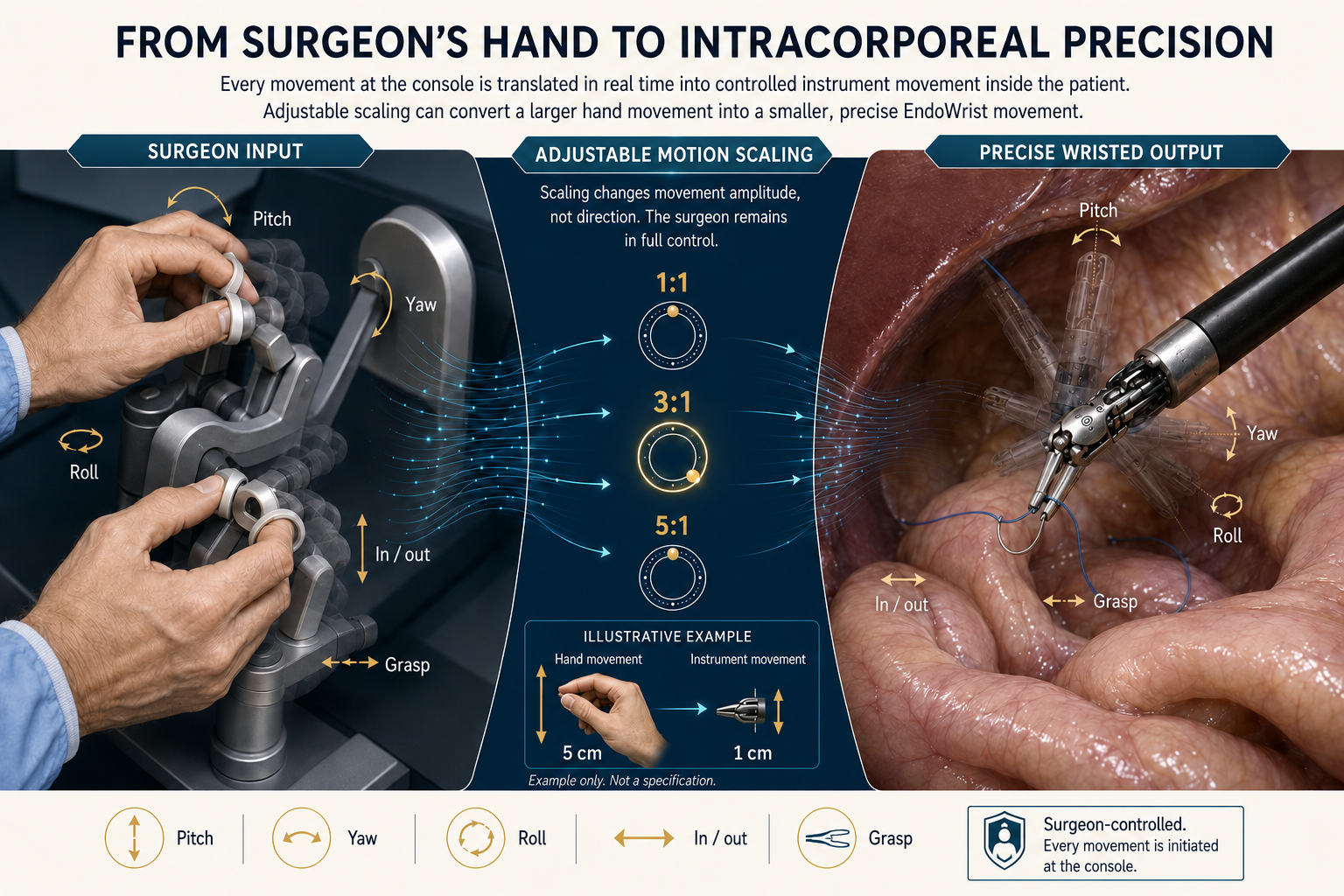
Console inputs are mapped to the EndoWrist with tremor filtration and adjustable motion scaling. A larger hand movement can become a smaller, deliberate internal stroke.
Robotics offers a mechanical precision advantage for selected suturing and dissection in confined spaces. Laparoscopy remains efficient, versatile and uniquely valuable when straight-shaft access suits the operation.
Degrees of freedom are counted differently across biomechanical and engineering models. More controllable axes can make certain suturing and deep-space manoeuvres easier, but they do not by themselves prove that one operative approach is safer or better for every patient.
Safe entry, exposure, anatomy, tissue respect, haemostasis, oncologic planes and an appropriate exit strategy remain fundamental.
The surgeon works at a console with a magnified stereoscopic view. Internal wrist articulation can reduce the fixed-axis constraint of conventional straight instruments.
Colorectal, gastrointestinal, hepato-pancreatico-biliary, gynecological, urological, hernia and cancer surgeries in the thoracic, abdominal and pelvic cavities.
Four parts, one room
A typical setup links the surgeon console, patient-side instrument cart, vision/integration equipment and a trained bedside team.
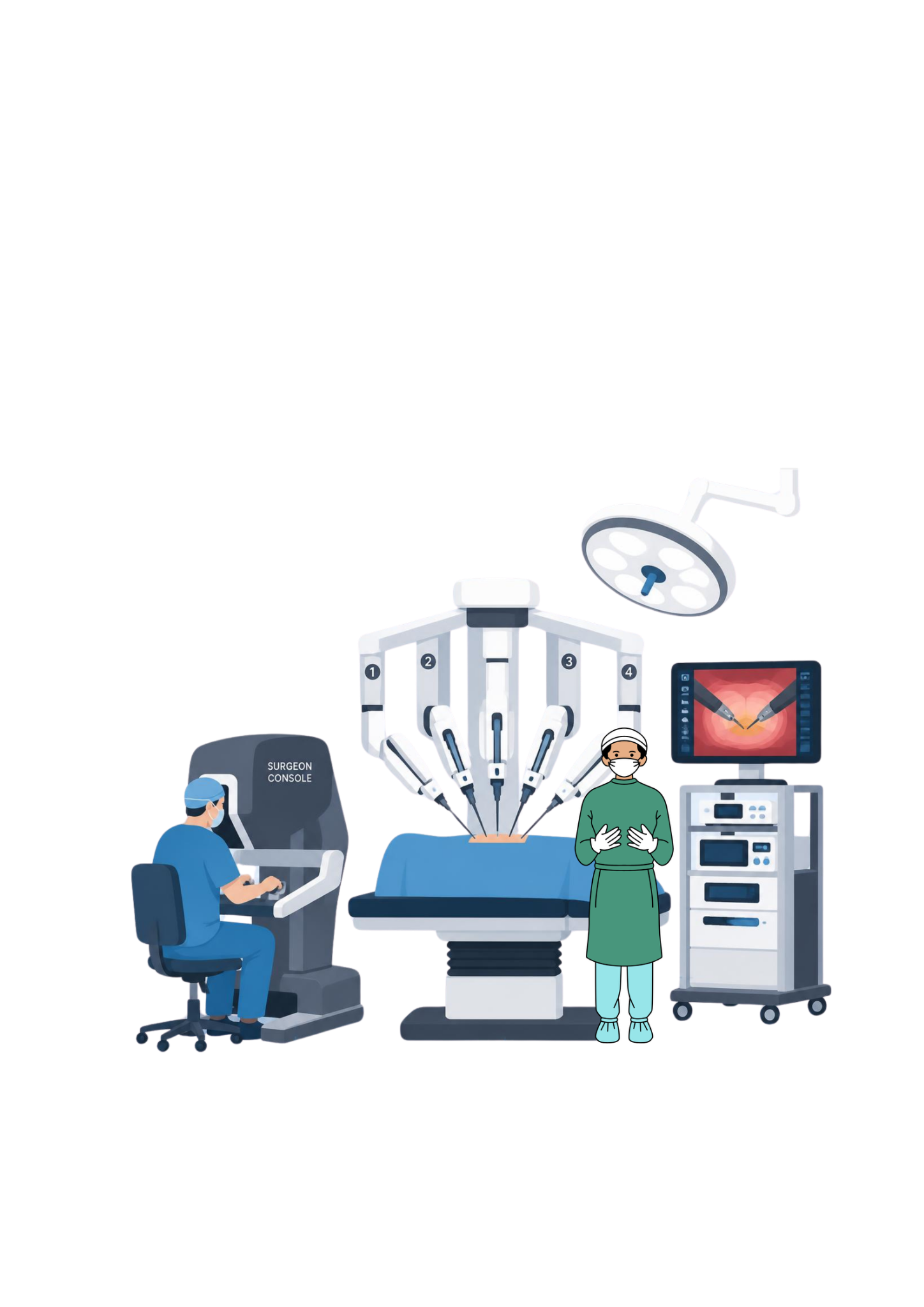
The surgeon views a magnified stereoscopic field and controls the camera and wristed instruments through coordinated hand and foot inputs.
Articulated arms dock to selected ports, holding the endoscope and instruments while translating the surgeon's movements at the operative field.
A trained assistant remains with the patient to exchange instruments, manage access, support exposure and respond immediately when needed.
The shared display, camera processor, light source, insufflation and energy systems connect the operative image with the supporting technology.
How a robotic operation unfolds
The exact sequence differs by procedure, but the core workflow keeps access, visibility, instrument control and bedside readiness connected.
Review imaging, choose approach, mark target and design ports.
Create working space and place camera and ports under vision.
Align the patient cart and connect selected arms to the ports.
The surgeon controls camera and wristed instruments from the console.
The bedside team exchanges tools, assists and remains at the patient.
Undock, inspect, remove specimen if required and close access sites.
SPARK selection logic
No technique wins every case
The best access is the one that allows the operation to be completed safely and effectively for that patient—not the one with the newest name.
Direct incision
Ports / keyholes
Ports / keyholes
Direct operative view
2D or 3D monitor
Magnified stereoscopic console view
Full hand motion
Mostly straight, fixed-shaft tools
Wristed internal articulation
Wide exposure or immediate direct access is safest
A proven, efficient keyhole route fits the task
Wristed dexterity / 3D view adds practical value
Common questions
Technology is easiest to understand when its limits are explained as clearly as its possibilities.
No. In robotic-assisted surgery, the surgeon controls the camera and instruments from a console. The system translates those inputs; it does not plan, decide or operate autonomously.
No. Some operations are completed very effectively with conventional laparoscopy, while wristed instruments or 3D vision may be useful in selected deep, narrow or reconstructive work. The right approach depends on the operation, patient, evidence, team and available expertise.
Not necessarily. Robotic and laparoscopic surgery both use ports, and the number and diameter depend on the operation and system. A separate extraction incision may be needed to remove an organ or specimen safely.
Its lens looks obliquely. Rotating the telescope lets the surgeon inspect over, under and around structures without moving the access port as much. A zero-degree scope gives a direct straight-ahead view.
Yes. Conversion is a safety decision, not a failure. Bleeding, adhesions, unclear anatomy, unexpected disease or difficulty progressing safely may make a larger incision the most responsible option.
The surgeon works backwards from the target anatomy: the camera needs a clear overview, instruments need distance and triangulation, and ports must avoid collisions and vulnerable structures. Previous scars, body habitus and the exact procedure can change the plan.
Clinical references
This educational guide uses authoritative surgical-system and minimally invasive surgery resources. It does not replace individual assessment, consent or an operative plan.
A technique follows a diagnosis
Bring your reports, scans and questions. A consultation can clarify whether open, laparoscopic or robotic access is appropriate and why.